chores
releasev1.1.0Native macOS menu-bar app, runner and Claude Code skill that schedules, records and watches your background jobs
README Snapshot
Chores
A native macOS menu-bar app that schedules, records and watches your background jobs — the
nightly backups, hourly syncs and daily claude -p checks that pile up as scattered launchd
agents, each logging somewhere else, or nowhere.
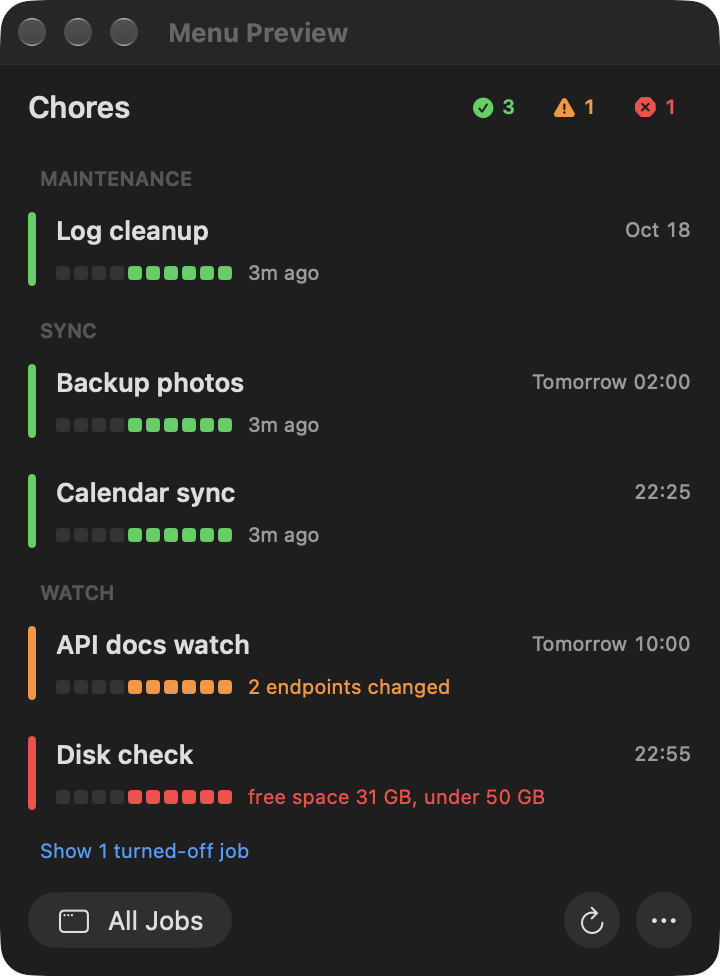
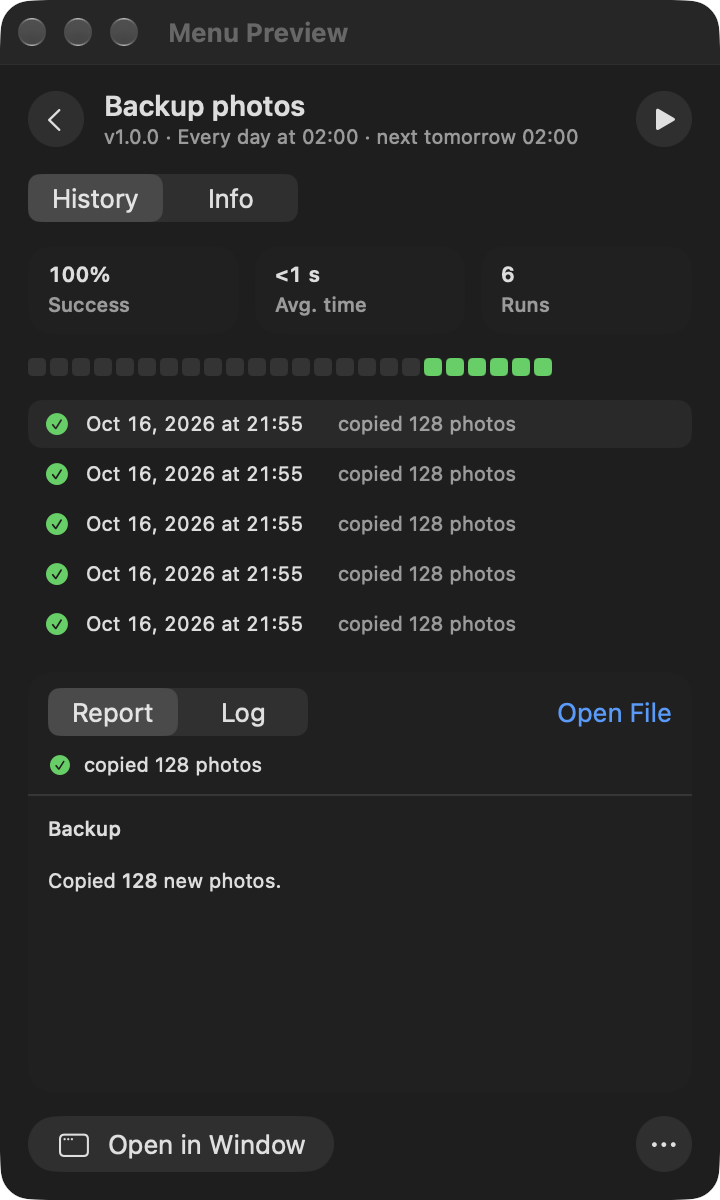
Chores runs every job through one runner that records each run (start, end, exit code, outcome, a one-line summary, the log and an optional report) and one scheduler inside the app that starts them on time. The menu bar shows what ran, what failed and what runs next; a notification tells you when something needs attention. A Claude Code skill sets new jobs up in the right shape, so you ask for a job in plain words instead of writing plists.
Features
- One place for every job. Jobs grouped by category with their last runs as a coloured strip, the latest summary and the next run time. The ok / warn / fail counts filter the list.
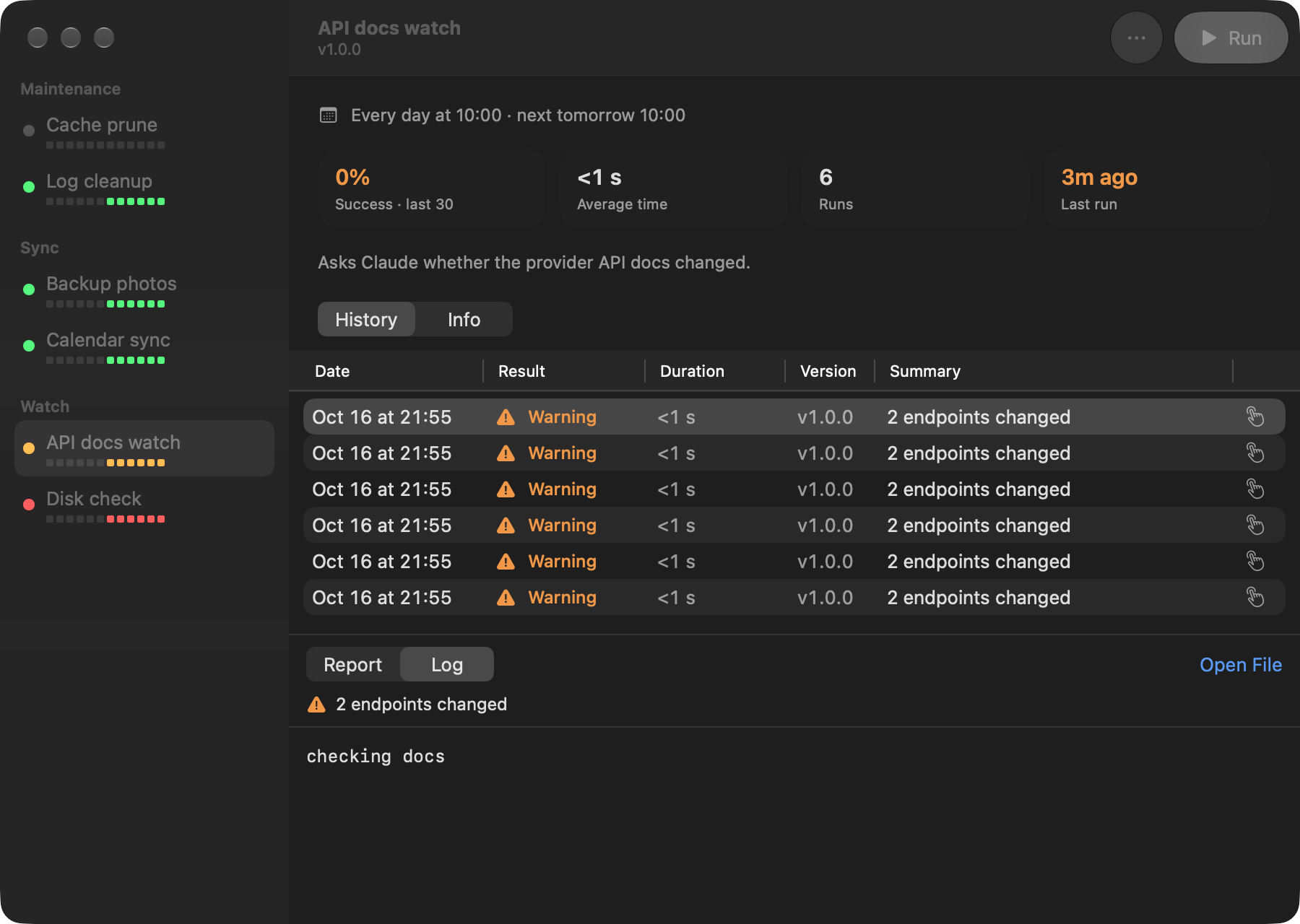
- Run history that launchd never kept. Every run's outcome, duration, summary, log and report in a window with a sortable history table. Select runs (Shift / ⌘) to delete them.
- Notifications that do not nag. Each job chooses which outcomes notify; a problem that repeats unchanged is reminded about at most once an hour.
- Run, turn off, turn on from the menu, the window or the
choresCLI. - One login item. A single scheduler agent inside the app replaces one launchd agent per job, so System Settings › Login Items shows one "Chores" row.
- Updates itself from the release tags of the repository it was built from.
- English and Turkish, following the system or chosen in Settings.
Requirements
- macOS 26 or later
- Xcode 26 or later (its Swift toolchain builds the app; there is no prebuilt download)
- Claude Code to create jobs with the skill
(optional: a job is a folder with a
job.json, which you can also write yourself)
Install
git clone https://github.com/voyvodka/chores.git
cd chores
scripts/install.sh
install.sh builds the runner to ~/.local/bin/chores and the app to ~/Applications/Chores.app,
registers the scheduler and opens the app. The app adds itself to Login Items on first launch.
Allow notifications once in System Settings › Notifications › Chores.
Then give Claude Code the skill, for each Claude configuration you use:
mkdir -p ~/.claude/skills && ln -s "$PWD/skill" ~/.claude/skills/chores
Create a job
Ask Claude Code for it: "Every morning at 9, check whether the provider's API docs changed and
report what is new." The chores skill writes the job folder, validates it and hands it to the
scheduler. It also moves an existing launchd agent under Chores when you ask.
A job is a folder in ~/.local/share/chores/jobs/<id>/:
job.json   what it is: title, summary, command, schedule, timeout, notifications, version…
run.sh     the script (or whatever `command` runs)
The script reports its outcome by writing one line to $CHORES_RESULT, for example
warn 2 endpoints changed, and optionally the path of a report. A non-zero exit is always a
failure. skill/SKILL.md is the full contract.
Command line
chores list                        scheduler state, every job and its last run
chores run <id>                    run a job now in this terminal and record it
chores start|stop|disable|enable <id>   the app's Run, Stop, Turn Off and Turn On
chores delete-runs <id> <run-id>… | --all
chores validate <id>               check a job.json
chores install|uninstall <id>      hand a job to the scheduler, or take it away
chores retire <label>              unload a pre-Chores launch agent, keeping its plist
chores paths                       where jobs, settings and logs live
Updates
Once a day the app fetches the repository's release tags into its own clone
(~/.local/share/chores/source). When a newer vX.Y.Z exists it builds it, waits until no job is
running, installs it and reopens, then tells you how it went. Settings › Updates turns this off,
checks now and shows the log. Your own checkout is never touched; to run unreleased changes,
git pull && scripts/install.sh as before.
Job templates
templates/ holds jobs meant for more than one Mac, each with its own setup.sh:
inbox-watchreads a Gmail inbox twice a day (read-only) and has Claude report only the mails that need action, in English or Turkish.
Uninstall
Quit Chores from its ⋯ menu, then:
~/Applications/Chores.app/Contents/MacOS/ChoresApp --unregister-scheduler
~/Applications/Chores.app/Contents/MacOS/ChoresApp --unregister-login-item
rm -rf ~/Applications/Chores.app ~/.local/bin/chores
rm -rf ~/.local/share/chores    # jobs, run history, settings and the update clone
Development
swift build && swift test
.build/debug/ChoresApp --show-menu-preview    # the menu panel in a window, without installing
.build/debug/ChoresApp --show-window          # add CHORES_HOME=<folder> for test data
scripts/sync-strings.sh                       # bring the string catalog in line with the code
scripts/compile-icon.sh                       # after editing assets/Chores.icon in Icon Composer
The package has three products: ChoresKit (the job contract and all logic, UI-free and unit
tested), the chores runner and ChoresApp (SwiftUI with AppKit where needed). UI strings are
English in code and translated in Sources/ChoresApp/Resources/Localizable.xcstrings; a test
fails on a missing translation. Changes go through pull requests with a type label and an entry
in CHANGELOG.md; a vX.Y.Z tag on main is a release.
License
Changelog
Changelog
All notable changes to this project are documented here. The format follows
Keep a Changelog and versions follow
Semantic Versioning. A release is a vX.Y.Z tag on main; installed apps
update themselves to it.
Unreleased
1.1.0 - 2026-10-16
Added
- A running job's log is shown live, followed to its end, in the window and on its menu page until a past run is picked.
- Search in the window's sidebar: by title, id, description, category or the last run's summary, ignoring case and accents.
- Stop a running job: the stop button on a running job's card (on hover), on its menu page and in the window toolbar, or
chores stop <id>. The run is recorded as a fail "Stopped by the user" and never notifies; Ctrl-C onchores runcounts the same. - An app icon: a check over the coloured run strip, made in Icon Composer so macOS draws it in Liquid Glass and its dark, clear and tinted styles. It is compiled ahead of time (
scripts/compile-icon.sh) and shown in Settings › About.
Changed
- The skill's job categories are English (
watch,maintenance,sync,report) and the app shows them in its own language; any other category is shown as written. templates/inbox-watch1.2.0 is in English. Its report language isconfig.json › language(enortr): new installs start in English, existing installs keep Turkish. Answers in the old Turkish level names are still understood.- CI also builds and tests with Xcode 27 on macOS 27; macOS 26 stays the required check.
- A calendar time that comes while the job is still running is skipped, as before, and now leaves a
skippedline in the scheduler log. - Scheduled jobs run at normal priority. The scheduler agent was
Background, which every job inherited, and the same work took about six times as long as from a terminal. - While a job runs, the Mac does not go to sleep on its own; closing the lid or choosing Sleep still sleeps it. The hold is released after the job's timeout, or after an hour for a job without one.
- Durations and the average time leave out time the Mac slept during a run; the history shows a moon on such runs with the time asleep. A run records it as
asleepSeconds, and a timeout counts awake time as before.
Fixed
- A job without runs no longer shows its header in the middle of the window.
- Settings tabs no longer scroll or tint the toolbar when hovered or swiped. The window rounds its height down, so a tab whose text wrapped (General, Updates) was a fraction of a point taller than the window and could scroll by that much, which switched on the toolbar's scroll edge effect.
- A
runAtLoadjob that was off when Chores started no longer runs the moment it is turned back on in the same boot; like any other run missed while off, it waits for the next boot. - The tests remove the temporary job folders they create.
1.0.1 - 2026-10-16
Fixed
- A self-update now quits the running app before installing and reopens the new version.
install.shruns as a descendant of the app during an update, andpkillleaves its own ancestors alone, so the old app kept running and the next daily check would have installed the same release again.
1.0.0 - 2026-10-16
The first public release.
Added
choresrunner and job contract: each job lives in its own folder (job.json,runs.jsonl,logs/, reports); every run is recorded with its start, end, exit code, outcome, one-line summary, log, report, trigger and job version. The script reportsok|warn|fail <summary>(and optionallyreport <path>) through$CHORES_RESULT; a non-zero exit is always a failure, andchores runexits with the recorded outcome (0 ok, 1 fail, 3 warn, 2 not started).- The runner forwards SIGTERM/SIGINT/SIGHUP to the job's process group and still records the run, escalates to SIGKILL after a timeout or a stop, stops processes a job leaves behind, never runs a job twice at once, and prunes history to the newest 500 runs under a lock.
- One scheduler agent embedded in Chores.app schedules every job (calendar entries with a single catch-up after sleep, intervals counted from the last run, once-per-boot
runAtLoad), so System Settings › Login Items shows a single Chores row. Turning a job off is a setting; the scheduler keeps a heartbeat, runs as a single instance and is re-registered byinstall.sh. - Jobs carry a version with a changelog, a category, required commands, a project folder and links.
- CLI:
run,start,disable,enable,delete-runs,install,uninstall,validate,list,retire(moves a pre-Chores launch agent's plist aside and prints the undo command),scheduler,paths. choresClaude Code skill (skill/SKILL.md) that creates jobs and migrates launch agents to the contract, with recipes forclaude -pjobs.- Menu-bar app (macOS 26): overall status icon; jobs grouped by category with a coloured edge, the last ten runs and a hover run button; ok/warn/fail counts that filter the list; turned-off jobs behind a link; a job page that slides into the panel with stats, recent runs, report or log, and job info; a warning with a restart button when the scheduler stops.
- Job window: sidebar of jobs, Run and ⋯ in the toolbar, summary tiles, a sortable history table with the job version per run, and the selected run's summary above its report or log. The Report/Log choice and the History/Info tab are remembered.
- Deleting runs: select rows in the history (Shift/⌘ for several) and press Delete or use the context menu, or clear a job's history from ⋯. Logs and the reports inside the job folder go with them.
- Notifications for finished runs according to each job's
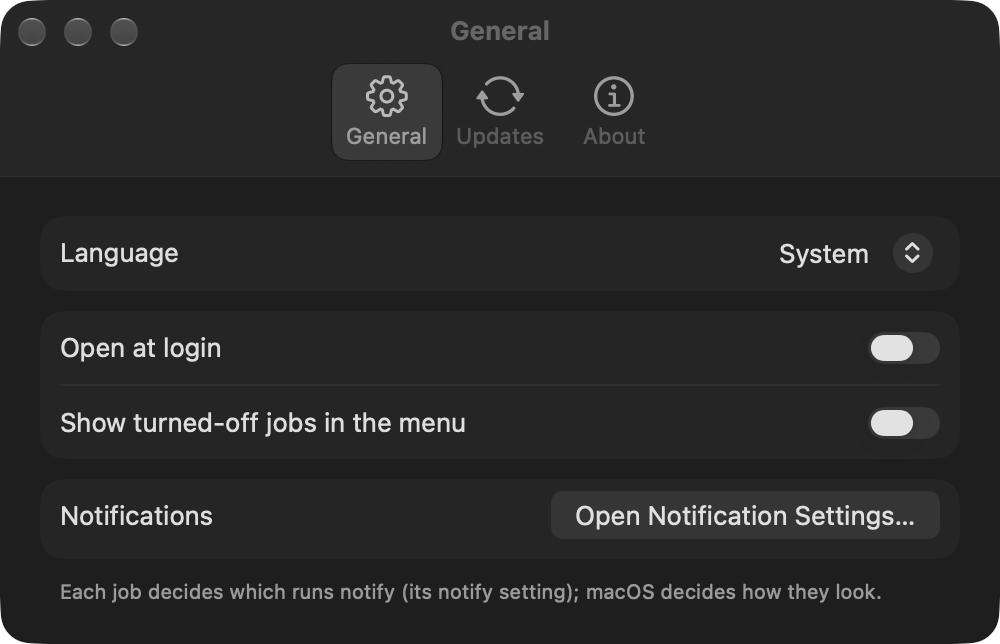
notifysetting (default warn and fail), opening the job when clicked, with anosascriptfallback when the app is not running. A problem that repeats unchanged is notified when it starts and then at most about once an hour. - Settings (⌘,): language (System, English, Türkçe), open at login, showing turned-off jobs in the menu, notification settings, updates, and an About tab with the version, build, scheduler state, jobs folder, runner and source.
- Self-update from git: once a day the installed app fetches release tags into its own clone of the repository it was built from; for a newer one it builds it, waits until no job is running, installs it with
scripts/update.sh, reopens and notifies the result. - English and Turkish: English is the source language and Turkish ships in a string catalog (
scripts/sync-strings.shkeeps it in line with the code, a test checks every key is translated). Dates, durations, percentages and schedules follow the app's language; the CLI is English. templates/inbox-watch: a shareable job that reads a Gmail inbox twice a day (read-only OAuth, secrets in the Keychain) and hasclaude -preport only the mails that need action, with Gmail links;setup.shinstalls or updates it on any Mac running Chores.ChoresApp --snapshotrenders the menu and window off-screen with a layout report;--show-menu-preview,--show-windowand--show-settingsopen them from a debug build.
Releases
- Chores 1.1.0Open on GitHub
Added
- A running job's log is shown live, followed to its end, in the window and on its menu page until a past run is picked.
- Search in the window's sidebar: by title, id, description, category or the last run's summary, ignoring case and accents.
- Stop a running job: the stop button on a running job's card (on hover), on its menu page and in the window toolbar, or
chores stop <id>. The run is recorded as a fail "Stopped by the user" and never notifies; Ctrl-C onchores runcounts the same. - An app icon: a check over the coloured run strip, made in Icon Composer so macOS draws it in Liquid Glass and its dark, clear and tinted styles. It is compiled ahead of time (
scripts/compile-icon.sh) and shown in Settings › About.
Changed
- The skill's job categories are English (
watch,maintenance,sync,report) and the app shows them in its own language; any other category is shown as written. templates/inbox-watch1.2.0 is in English. Its report language isconfig.json › language(enortr): new installs start in English, existing installs keep Turkish. Answers in the old Turkish level names are still understood.- CI also builds and tests with Xcode 27 on macOS 27; macOS 26 stays the required check.
- A calendar time that comes while the job is still running is skipped, as before, and now leaves a
skippedline in the scheduler log. - Scheduled jobs run at normal priority. The scheduler agent was
Background, which every job inherited, and the same work took about six times as long as from a terminal. - While a job runs, the Mac does not go to sleep on its own; closing the lid or choosing Sleep still sleeps it. The hold is released after the job's timeout, or after an hour for a job without one.
- Durations and the average time leave out time the Mac slept during a run; the history shows a moon on such runs with the time asleep. A run records it as
asleepSeconds, and a timeout counts awake time as before.
Fixed
- A job without runs no longer shows its header in the middle of the window.
- Settings tabs no longer scroll or tint the toolbar when hovered or swiped. The window rounds its height down, so a tab whose text wrapped (General, Updates) was a fraction of a point taller than the window and could scroll by that much, which switched on the toolbar's scroll edge effect.
- A
runAtLoadjob that was off when Chores started no longer runs the moment it is turned back on in the same boot; like any other run missed while off, it waits for the next boot. - The tests remove the temporary job folders they create.
- Chores 1.0.1Open on GitHub
Fixed
- A self-update now quits the running app before installing and reopens the new version.
install.shruns as a descendant of the app during an update, andpkillleaves its own ancestors alone, so the old app kept running and the next daily check would have installed the same release again.
- A self-update now quits the running app before installing and reopens the new version.
- Chores 1.0.0Open on GitHub
The first public release of Chores: a native macOS menu-bar app, a runner and a Claude Code skill that schedule, record and watch your background jobs.
Requires macOS 26 and Xcode 26. Install from source:
git clone https://github.com/voyvodka/chores.git && cd chores && scripts/install.shFrom here on, installed apps update themselves to new release tags.
Added
choresrunner and job contract: each job lives in its own folder (job.json,runs.jsonl,logs/, reports); every run is recorded with its start, end, exit code, outcome, one-line summary, log, report, trigger and job version. The script reportsok|warn|fail <summary>(and optionallyreport <path>) through$CHORES_RESULT; a non-zero exit is always a failure, andchores runexits with the recorded outcome (0 ok, 1 fail, 3 warn, 2 not started).- The runner forwards SIGTERM/SIGINT/SIGHUP to the job's process group and still records the run, escalates to SIGKILL after a timeout or a stop, stops processes a job leaves behind, never runs a job twice at once, and prunes history to the newest 500 runs under a lock.
- One scheduler agent embedded in Chores.app schedules every job (calendar entries with a single catch-up after sleep, intervals counted from the last run, once-per-boot
runAtLoad), so System Settings › Login Items shows a single Chores row. Turning a job off is a setting; the scheduler keeps a heartbeat, runs as a single instance and is re-registered byinstall.sh. - Jobs carry a version with a changelog, a category, required commands, a project folder and links.
- CLI:
run,start,disable,enable,delete-runs,install,uninstall,validate,list,retire(moves a pre-Chores launch agent's plist aside and prints the undo command),scheduler,paths. choresClaude Code skill (skill/SKILL.md) that creates jobs and migrates launch agents to the contract, with recipes forclaude -pjobs.- Menu-bar app (macOS 26): overall status icon; jobs grouped by category with a coloured edge, the last ten runs and a hover run button; ok/warn/fail counts that filter the list; turned-off jobs behind a link; a job page that slides into the panel with stats, recent runs, report or log, and job info; a warning with a restart button when the scheduler stops.
- Job window: sidebar of jobs, Run and ⋯ in the toolbar, summary tiles, a sortable history table with the job version per run, and the selected run's summary above its report or log. The Report/Log choice and the History/Info tab are remembered.
- Deleting runs: select rows in the history (Shift/⌘ for several) and press Delete or use the context menu, or clear a job's history from ⋯. Logs and the reports inside the job folder go with them.
- Notifications for finished runs according to each job's
notifysetting (default warn and fail), opening the job when clicked, with anosascriptfallback when the app is not running. A problem that repeats unchanged is notified when it starts and then at most about once an hour. - Settings (⌘,): language (System, English, Türkçe), open at login, showing turned-off jobs in the menu, notification settings, updates, and an About tab with the version, build, scheduler state, jobs folder, runner and source.
- Self-update from git: once a day the installed app fetches release tags into its own clone of the repository it was built from; for a newer one it builds it, waits until no job is running, installs it with
scripts/update.sh, reopens and notifies the result. - English and Turkish: English is the source language and Turkish ships in a string catalog (
scripts/sync-strings.shkeeps it in line with the code, a test checks every key is translated). Dates, durations, percentages and schedules follow the app's language; the CLI is English. templates/inbox-watch: a shareable job that reads a Gmail inbox twice a day (read-only OAuth, secrets in the Keychain) and hasclaude -preport only the mails that need action, with Gmail links;setup.shinstalls or updates it on any Mac running Chores.ChoresApp --snapshotrenders the menu and window off-screen with a layout report;--show-menu-preview,--show-windowand--show-settingsopen them from a debug build.